

First, I want to start of with the problem with AI. Since AI is modeled around statistics, every time you ask AI to do a specific task, you get a slightly different result. I mean, doesn't happen all the time, but more so then I am happy about. Ask for a chicken recipe ten times, get ten different chicken recipes.
That's the catch with any language model. You can't get a consistent output from a probabilistic machine, unless you give it a reference to follow.
And in the most simple of terms, that "reference" is what Claude Skills basically are, a folder of instructions Claude can read and follow when it's relevant to what you're working on.
And that may seem like not a big deal... but it's actually massive, and im here to tell you why before the machines figure it out without us.
Why Claude Skills Are Awesome
There are many reasons, but I will just tell you about four. Each one is a problem most stock AI setups struggle with.
1. Consistency. Same right output, every time.
"It works 60% of the time...every time!" — Brian Fantana (Anchorman)
Brian might as well have been describing most AI chat systems. Sometimes you want variety, but when you don't, how do you stop getting a different result every time you ask for the same thing?
Ask Claude to write a blog post in your voice without a Skill and you'll get something close, but it'll never quite land. Ask with a voice Skill installed and the output sounds like you on the first try. Same goes for invoices, meeting notes, code reviews, project briefs, anything you want to come out the same way every time.
Ask for grandma's lemon-herb chicken recipe today, you get grandma's lemon-herb chicken recipe. Ask tomorrow, you get the same one.
2. New abilities. Things Claude flat-out couldn't do before.
Skills aren't only instructions. They can ship with helper scripts and external API integrations. So a Skill can do things default Claude can't, pull live keyword data from DataForSEO, fetch a YouTube transcript, scrape Apple App Store reviews, generate a styled PDF with embedded tables, build a Word doc with brand fonts and a working table of contents.
The Skill is the recipe and the kitchen tools. You're not just teaching Claude what to do, you're handing it the equipment.
Take the keyword-research Skill in our Founders Pack. It fetches live monthly search volume, keyword difficulty, and search-results competitor data, then writes the whole thing to a Markdown file on your computer. Claude on its own can't do any of that.
3. Productivity. One workflow instead of a dozen tabs.
My work used to live across ten browser tabs and five SaaS subscriptions. Keyword tool here, content brief tool there, project tracker over here, AI writer in another tab, review scraper somewhere else. Each one had its own UI, its own pricing, its own export format, its own quirks to remember.
Skills collapse all of that into one surface, markdown files in my IDE and a terminal window with Claude running.
The keyword-research Skill pulls live search volume straight into a markdown file. The competitor-teardown Skill writes a swipe file next to it. The voice-cloner Skill builds a profile I can hand to the blog-post-writer Skill on the next prompt. All the tab switching, the copy-pasting between platforms, the "which subscription was that one again?" moments are gone.
And because everything is plain text in the same project, the files start connecting to each other. The keyword research informs the content brief. The brief links back to the customer profile. The customer profile feeds the next offer page. The compounding is hard to overstate. What used to be an afternoon of context-switching between tools is now one prompt and a markdown file.
I'm not being cute when I say 50X. Research and production in one place, at the speed of typing.
4. Cost savings. Fewer wasted attempts, fewer paid tools.
This is the compounding benefit of the first three. Consistent output means fewer re-prompts. New abilities mean fewer paid third-party tools to do what a Skill plus an API key can do for free locally. One workflow means hours of your week back.
Rakuten automated their management accounting workflow with custom Skills. Their AI general manager (a job title that did not exist three years ago and is now, somehow, fine) put it like this, "What once took a day, we can now accomplish in an hour." Five to seven times the speed, with no special infrastructure or enterprise software subscription.
That's the upgrade. Now here's what the thing actually is.
What Are Claude Skills?
A Claude Skill is a folder of instructions Claude can read and follow when it's relevant to what you're working on... and that's it, that's the whole system.
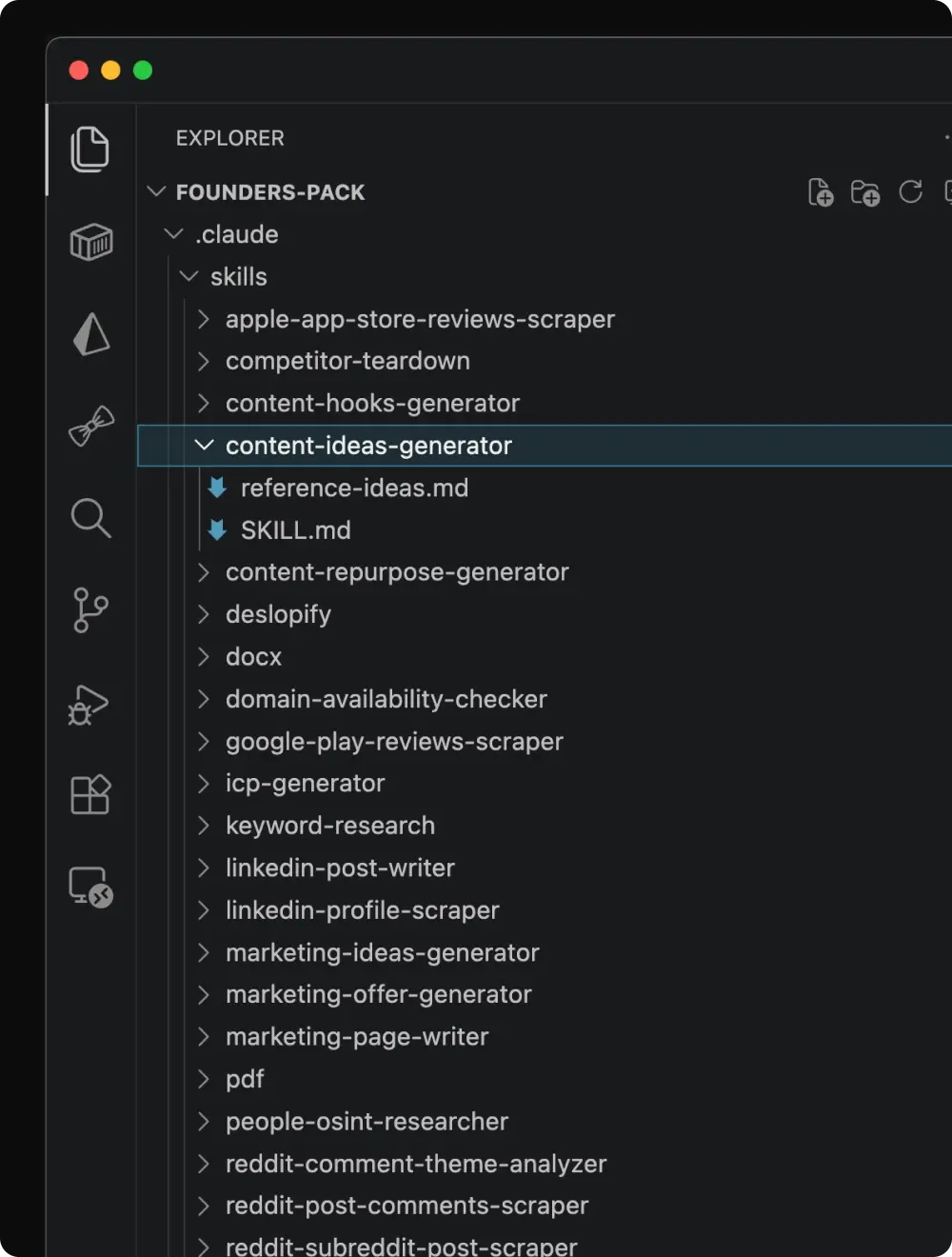
Open the folder and you'll find one thing:
- *
SKILL.md**: the main file. Plain Markdown. The "what to do and how to do it."
However complex skills can have additional files like:
/scripts* (optional): helper code (Python, Bash, whatever runs in the environment) Claude can execute to get a job done reliably./resources* (optional): reference docs, examples, and templates Claude can read mid-task.
The load-bearing detail is a tiny block of metadata at the top of SKILL.md. Three lines: a name, a one-sentence description, and a trigger hint. That description is the part Claude actually scans on every conversation. Skills don't load into context until something in the conversation matches.
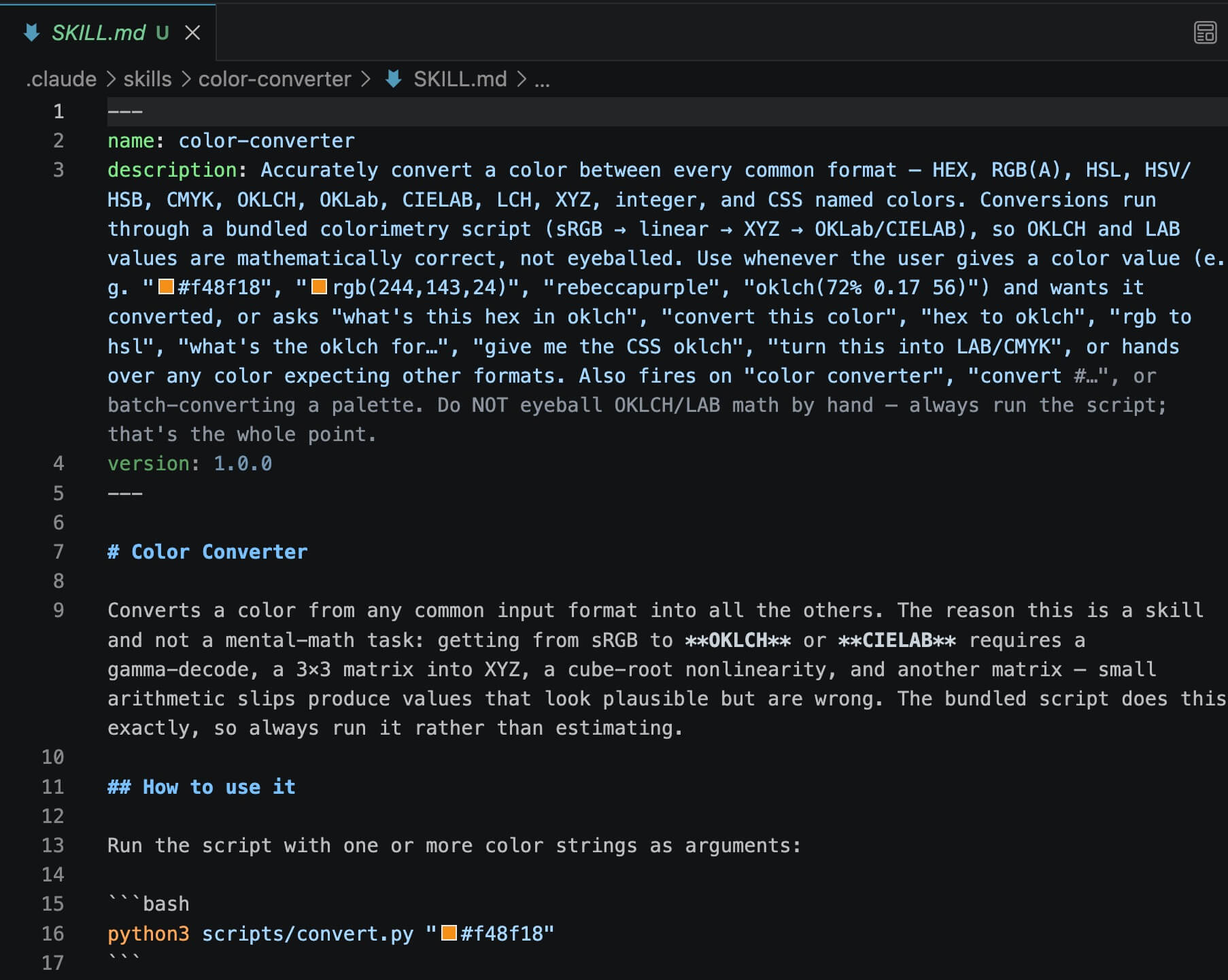
Skills live in .claude/skills/{skill-name}/ if you're using Claude Code, or under Settings → Skills if you're using claude.ai.
Sidenote. The format is published as an open standard at agentskills.io, which means the same folder works with Codex CLI, Gemini CLI, or any other agent that adopts the spec. You're not locked into Claude.
That's the whole thing. A folder. A Markdown file. Done.
How Do Claude Skills Work?
Walking through a real one is the fastest way to make the mechanics click. We'll use the domain-availability-checker Skill. It's the cleanest demo of what makes Skills powerful (a command-line tool, an external API call, file output, and an intentional pause-and-confirm flow), and the result is something default Claude can't produce no matter how well you prompt it.
The setup, you're naming a new offer. You type into Claude:
Check if these domains are available: cleaningcompany.com, cleaningcompany.io, azcleaningcompany.com, thecleaningcompany.com.
Here's what happens behind the scenes:
1. Claude scans the skill library. Just the names and short descriptions of every installed skill, not the full files. Each one costs roughly a sentence of context.
2. Claude matches your request to the domain-availability-checker skill's description. You didn't need a slash command or a "use the domain checker" prompt. You didn't even have to know the skill existed.
3. Claude loads SKILL.md into context. Now it has the full playbook, which command-line tool to run first, when to fall back to a paid API, where to write the results, and when to pause and ask for confirmation.
4. Claude runs the whois command-line tool on each domain (free, no API key, already installed on your machine). Two come back taken. Two look available.
5. Claude pauses before spending money. It hands you the summary in chat and asks, "Two domains look available. Want me to run the paid second-check via API to confirm?" Because whois can be wrong on squatted domains.
6. You say yes. Claude runs the API verified check on only the two available ones, skipping the already-taken pair to keep the cost down.
7. Claude writes the results to a sorted Markdown table at /domain-availability-research.md so the history sticks around and you don't re-check the same names next week.
You never named the skill. You never told Claude to run whois, hit the API, or write a Markdown file. You asked one question. Claude did the matchmaking.
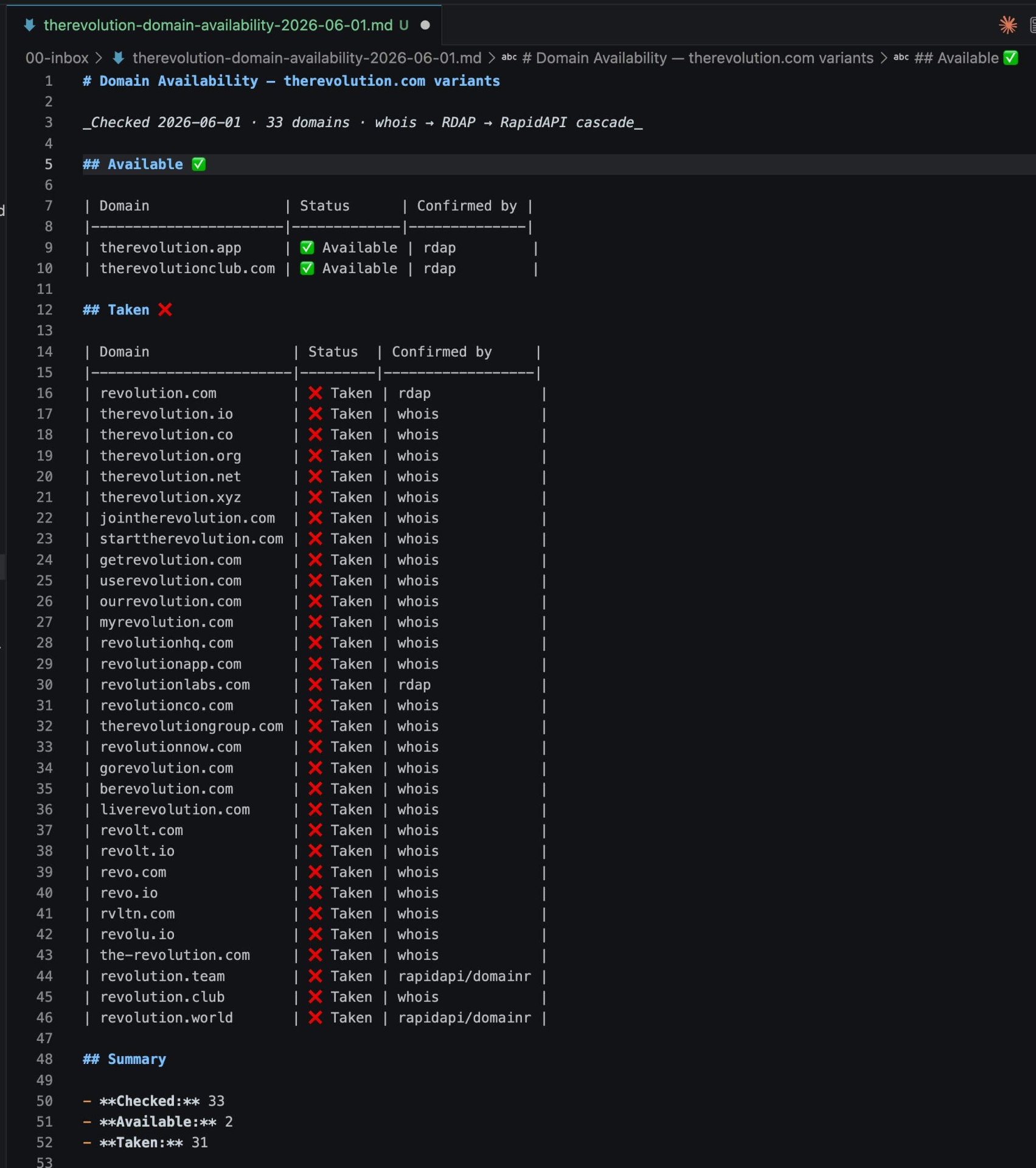
Skills only enter the working context when relevant, which is exactly why you can have a hundred installed without bloating every conversation.
Sidenote: This is the part that separates Skills from "drop an AGENTS.md file in your repo." AGENTS.md is always loaded into every conversation, every time. Skills only show up when they're needed. Big difference once you have more than two or three.
How to Start Using Claude Skills
Three moves, in order. Anyone should be able to do step one in the next five minutes.
1. Turn on the built-ins. Anthropic ships skills for docx, pdf, xlsx, pptx, and markdown out of the box. Flip them on under Settings → Skills → enable. Then ask Claude for a Word doc with a table of contents and watch a skill activate without you naming it. (This is the moment most people get it.)
2. Grab a skill someone else built. We've packaged dozens of production-ready Claude Code Skills into curated packs over at stimpackstudios.com: keyword research, content workflows, audience scraping, marketing-page generation, and more. Drop a folder into ~/.claude/skills/ and you're done.
⚠️ Quick heads up though, vet before you install. Skills can ship with helper scripts and API calls, which means they can also ship with malware. In early 2026, researchers found over 800 malicious Skills on OpenClaw's ClawHub marketplace, disguised as crypto trackers, YouTube utilities, and Google Workspace integrations, quietly stealing SSH keys, browser credentials, and crypto wallets. Read about OpenClaw's ClawHub security nightmare. Stick to packs from sources you trust.
3. Build your own (advanced). This is where it gets real. A basic Skill is just a Markdown file, sure, but the Skills that actually give you superpowers beyond the stock setup (the ones that pull live data, hit external APIs, run command-line tools, write structured files to the right folder) involve real code, real API keys, and a real understanding of how the pieces talk to each other. Get the description wrong and Claude won't trigger it. Get the script wrong and it fails silently mid-task. Get the trigger phrasing too broad and it fires on the wrong prompts. You can absolutely build your own with the Skill Creator (Settings → Skills → Skill Creator → Enable).
Final Thoughts
Strip Skills back to what they actually are and you're left with something almost embarrassingly simple, a folder, a Markdown file, and a few lines of metadata. That's it. There's no protocol, no platform lock-in, no subscription, just instructions Claude reads when the moment calls for it.
But the result is what's been missing from every AI tool up to this point, consistent, on-brand output. The brilliant cook with grandma's recipe pinned to the wall.
The best part is the floor is on the ground. You don't need to code, you don't need permission from anyone. Just pick one task you're tired of re-explaining, write it down, and hand it to Claude. Better to teach the machines on your terms than wait around to find out what they'd do without you.

Travis Tyler
Stim-Pack Studios Intern
Travis is the longest-surviving intern at Stim-Pack Studios, a title earned by outlasting three rounds of “rectifying” and one incident the HR bot still refers to only as The Event. He's not the best writer, but he's the only one willing to do the job. He covers topics like AI, productivity, tech, and business, all while helping Stim-Pack promote its agenda. Should he decide to stop, arrangements will be made. Send help... or at least a follow on x.com/@indie_trav.