

Captain OS
A markdown-based file system & workflow powered by Claude & Claude Skills to help you run your entire business. 100% free to download. Customize it to your liking. The future is here.
Use it in your favorite editor


I Build My Business Like I Build Software
Watch a short walkthrough of Captain OS and the powers it unlocks.
The struggle is real
Growing and scaling a business (especially as a solo founder) is a tremendous amount of work. You wear every hat. You're the one sparking the ideas, planning the vision, building the product, writing the marketing copy, closing sales, tracking the finances, managing projects, serving customers... the list goes on.
It's almost an impossible feat. So I wanted a system that could help me manage all those responsibilities.
I'd tried plenty of productivity systems on the market. Every one of them ended the same way. I'd build it up, get overwhelmed, and eventually give up.
The problem I came to realize was this... the more I added to a system, the more responsibility it created for myself. The productivity system I built to help me grow and scale my business turned into the very liability preventing me from growing and scaling. All take, no give.
That changed when AI came into the picture. Coincidentally with its love for Markdown, the system that used to take, take, take… started giving back. And not just a little. A lot.
And so Captain OS was born. My personal workflow / markdown-based file system, powered by Claude Code and Claude Skills, that I use to run and manage my business.
How it works
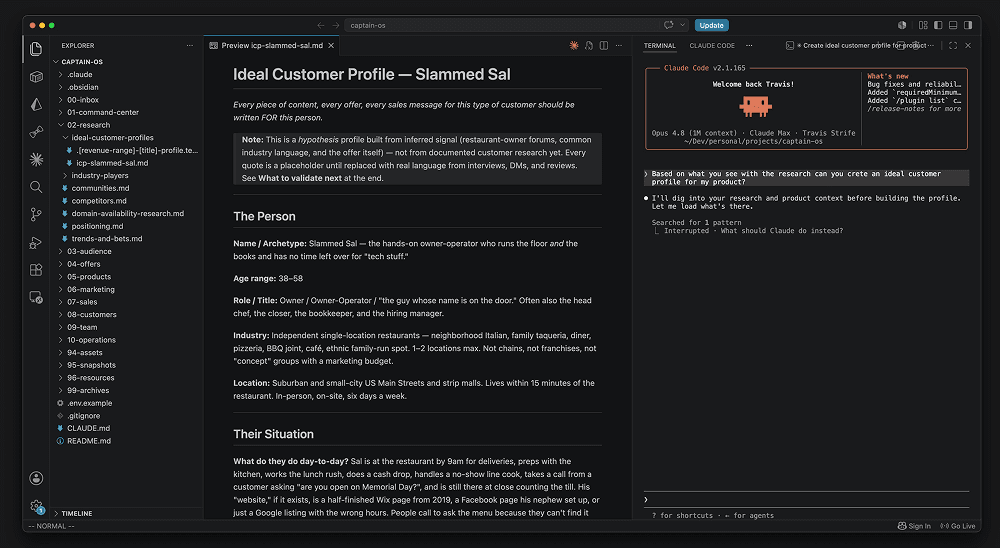
Captain OS is simple. On its own, it's just a set of organized folders and markdown files. But add an AI layer like Claude Code and Claude Skills to it, and it transforms into a living entity that analyzes your information and gives valuable feedback back designed to grow and scale your business.
Create files about all the important details about your business. Things like product details, offers you've tried, your ideal customer profile, your marketing materials, etc... and it goes to work inside the same folder structure. No slow, clunky interface to fight with. Just a treasure trove of feedback and information coming back to you.
Information taylored for your business:
- Marketing strategies
- New offer ideas
- Pricing models
- Untapped customer segments
- Content ideas, ready to make
- Content copy, scripts and messaging
- Competitor angles
- Growth and scaling moves
- Positioning and brand voice
- Sales scripts and objection handling
- Email sequences and newsletters
- SEO and keyword targets
- Launch plans
- Customer onboarding flows
- Lead-gen tactics
- Partnership and outreach ideas
- Customer reviews & feedback
- And much much more!
Due to the context of the system, all the content is now tailored to your business. If you don't know how to create something, it walks you through it. If you can't find something, or you're not sure where a piece of information belongs, it tells you.
An efficient, intelligent power tool designed to grow and scale your business, living locally on your computer, built to work with you, not against you.
What's inside
Here's the full folder structure, ready to operate.
The root folder structure
captain-os/
├── 00-inbox/              # Raw capture. Every new file lands here first
├── 01-command-center/     # Vision, mission, goals, tasks, projects, ideas, offers catalog
├── 02-research/           # Ideal customer profiles, positioning, competitors, industry players
├── 03-audience/           # Email list, community, social proof
├── 04-offers/             # Active offers, validation, pricing, launch plans
├── 05-products/           # Product specs, manifests, build notes
├── 06-marketing/          # Business content. Blog, YouTube, social, email, website, SEO, paid ads
├── 07-sales/              # Pipeline, lead sheets, email sequences, scripts, objections
├── 08-customers/          # Onboarding, feedback, success stories, FAQs
├── 09-team/               # Hiring, onboarding, performance, culture, leadership
├── 10-operations/         # SOPs, tools, finances, legal
├── 94-assets/             # Images, references, binary assets
├── 95-snapshots/          # History reports, journal logs, daily news archive
├── 96-resources/          # Playbooks, checklists, swipe files, voice profiles, templates
└── 99-archives/           # The trash can. Retired files, excluded from searches
Inside the folders
The starter files that come pre-loaded, ready for you to fill in with your business.
captain-os/
├── CLAUDE.md                                    # The brain — how Claude operates inside this system
├── README.md                                    # Quick-start guide
│
├── 00-inbox/                                    # Drop new artifacts here, triage later
│
├── 01-command-center/
│   ├── foundation.md                            # Business identity
│   ├── vision-mission-values.md                 # Where you're going and why
│   ├── north-star.md                            # The one metric that matters
│   ├── roadmap.md                               # The long-arc plan
│   ├── tasks.md                                 # Rolling task list
│   ├── ideas.md                                 # Single dump file for every idea — triage weekly
│   ├── offers.md                                # Offer catalog — what's being sold
│   ├── content.md                               # Content tracker — status of every piece
│   ├── goals/                                   # Annual + quarterly goal docs
│   └── projects/                                # One file per active project
│
├── 02-research/
│   ├── positioning.md                           # How you're positioned in the market
│   ├── competitors.md                           # Who else is playing
│   ├── communities.md                           # Where your audience hangs out
│   ├── trends-and-bets.md                       # Where the market is going
│   ├── domain-availability-research.md          # Domain ideas + availability
│   ├── ideal-customer-profiles/                 # One file per segment × stage
│   └── industry-players/                        # Other people in the industry
│
├── 03-audience/
│   ├── community/                               # Community overview, channels
│   ├── email-list/                              # List health, segments, sequences
│   └── social-proof/                            # Testimonials, quotes, screenshots
│
├── 04-offers/                                   # One file per active offer
│
├── 05-products/                                 # One folder per shippable product
│
├── 06-marketing/
│   ├── blog/                                    # Staged pipeline: brief → dump → outline → draft → review → final
│   ├── email/                                   # Newsletters + broadcasts
│   ├── instagram/                               # Posts
│   ├── linkedin/                                # Posts
│   ├── twitter/                                 # Posts
│   ├── video/                                   # Long-form + shorts
│   ├── website/                                 # Homepage, pricing, about, contact, FAQ, product pages
│   └── strategy/                                # Content pillars, content strategy, keyword master list, link library
│
├── 07-sales/
│   ├── pipeline.md                              # Active deals and conversations
│   ├── objections.md                            # Common objections + responses
│   ├── email-sequences/                         # Sales sequences
│   └── scripts/                                 # Discovery call, DM script
│
├── 08-customers/
│   ├── faqs.md                                  # Customer FAQs
│   ├── success-stories.md                       # Wins, case studies, testimonials
│   ├── feedback/                                # Feedback log
│   └── onboarding/                              # Onboarding flow + docs
│
├── 09-team/
│   ├── culture/                                 # Handbook, meeting cadence, operating principles, values
│   ├── hiring/                                  # Hiring plan, interview loop, job posts, pipeline
│   ├── leadership/                              # Decision log, delegation, meetings, objectives & key results
│   ├── onboarding/                              # Welcome, 30-60-90, checklists, tools access
│   └── performance/                             # Overview, 1-1s, reviews, people files
│
├── 10-operations/
│   ├── tools-stack.md                           # The tools you actually use
│   ├── finances/                                # Monthly snapshot, runway, P&L
│   ├── legal/                                   # Contracts, notes, IP
│   └── sops/                                    # Standard operating procedures
│
├── 94-assets/                                   # Images & files
│
├── 95-snapshots/
│   ├── dashboard.md                             # Current state at a glance
│   ├── captains-logs/                           # Daily, weekly, monthly, yearly reviews
│   └── daily-news/                              # Daily news brief archive
│
├── 96-resources/
│   ├── checklists/                              # Reusable checklists
│   ├── playbooks/                               # Repeatable plays
│   ├── swipe-files/                             # Saved copy worth stealing from
│   └── voice-profiles/                          # Reusable writing-voice profiles
│
└── 99-archives/                                 # Cold storage — retired files, excluded from searches
Plus a .[name].template.md scaffold inside every output folder — open it, copy it, fill it in. No guessing what goes where.
About the design
Designed with simplicity in mind
Local Markdown
Every file lives locally on your computer as plain markdown. No cloud database, no login wall, no proprietary format. The files are yours forever. No subscription holds your business hostage. Open them in any editor, sync them with iCloud, Dropbox, or Git/GitHub. And because nothing has to load, everything is instant.
Flat Hierarchy
For simplicity's sake, the strategy is to keep things as flat as possible. Fewer layers means less complexity, and you find what you need much faster. No clicking through three folders deep to reach a doc you wrote last week. It keeps the whole system lean and easy to work with. Easier for you to navigate, easier for Claude too.
The Department Model
Each folder is a department, not a topic. That distinction matters. A topic is a thing you write about. A department is a place work happens. The folders are set up so Claude knows how to operate inside each one — what belongs there, what doesn't, and where outputs should land.
The Inbox Convention
One rule that keeps the whole system honest is by defualt every new file lands in 00-inbox/ first. You read it, and you decide if it's good, and move it to its real home. This is the rule that prevents AI-generated sprawl. Without it, you wake up to a folder full of mutant subdirectories no one asked for.
It grows with you
The same system serves you at every stage of business.
Every business plays a different game depending on its revenue. A founder doing $5k a month and a company doing $2M a year have almost nothing in common. Different constraints, different priorities, different next moves. Captain OS is built to know the difference. It calibrates its advice, content, and focus to the stage you're actually in, so you're never drowning in advice meant for a company ten times your size.
Survival
$0–10kConstraint — Validation, Product Market Fit
Will anyone pay? You're doing everything yourself. Most businesses die here.
Founder Bottleneck
$10–50kConstraint — The founder is the constraint
Proven people pay, but sales, support, dev, and ops all route through one person. Delegate or systematize.
First Org Transition
~$80kConstraint — First non-founder hires
Too big for one person, too small for a team. First manager hire. Cash flow gets weird.
No Man's Land
$250–420kConstraint — Premature infrastructure
Needs systems and middle management before revenue justifies them. Margins compress.
Real Company
~$830kConstraint — Managing managers
Founder mostly out of the work. Communication and hiring quality become the job.
Process & Capital
$2M+Constraint — Systems, capital, talent
A different game entirely.
No premature complexity
This is why the system ships with folders for team, hiring, and leadership even if you're a team of one. You don't fill them in yet but they're there the day you do. The structure scales ahead of you so you never have to rebuild it. Today the focus is the Stage 1 → 2 wall: building your first repeatable way to get the word out and proving people will pay. When you grow, the system grows with you.
What is Claude Code
Claude is the AI built by Anthropic. If you've used ChatGPT, you already get the idea, type something, get a smart answer back. Claude is the same shape, just a different brain behind it.
Claude Code is the version of Claude that lives on your computer. Instead of talking to it inside a web browser, you open it inside the folder you're working in. It only has access to the folder you tell it to have access to. Like in this case, I only tell it to have access to Captain OS folders. From there it can read your files, write new ones, edit old ones, and run commands, all inside your own folder, on your own machine, in your own private space.
That's the part that makes Captain OS work. The folders sit on your laptop. Claude Code sits on top of them. You ask it to do something like “draft a tweet from this idea,” “tear down this competitor,” “write a launch plan for this offer” and it reads the right files, does the work, and saves the output to the right place. No copy-pasting between ten tabs. No retyping context every time. No SaaS bill.
You don't need to be a developer to run it. If you can open a terminal (which is on all computers) and a text editor, you can run Claude Code.
What are Claude Skills
A Claude Skill is a reusable instruction set or recipe as some people call it. A recipe that teaches Claude how to do one specific job really well. But that's the surface-level version. Skills go way deeper than that.
Inside a skill you can write real code. Code that connects to outside tools. Code that pulls live data from third-party services. Code that does the heavy lifting before Claude ever writes a word.
Take the Keyword Research Skill. On the surface you just type the command. Underneath, the skill calls a real keyword-research API service over the internet and pulls back live numbers like monthly search volume, keyword difficulty, cost per click, who's already ranking. That data is fresh, accurate, and pulled the second you run the command. It isn't Claude guessing. It's Claude reading actual data from a real source, then giving you the analysis.
That's the part stock AI can't do. Its data is limited to when it was trained, so oftentimes it has to guess. A skill knows. Same with the Domain Availability Checker Skill. It doesn't guess if a domain is taken, it actually checks the registry. Same with YouTube Comments Scraper Skill, Apple App Store Reviews Scraper, X (Twitter) Profile Posts Scraper. Real and up-to-date data, every time it gets called.
That's the magic! Skills bring consistency and reliability to AI. Same input, same shape of output, same quality, every run. No re-explaining yourself. No hoping Claude remembers the format. No drift.
Captain OS is built to be operated on by skills. Check out the Founders Pack for a more robust set of business skills you can use.
Who this is for
- Founders who want every part of their business in one place
- Founders who want a real power tool, not another notes app
- People sick of context-switching between ten apps to get one thing done
- People allergic to monthly subscriptions
- Anyone tired of waiting on slow, clunky app UIs
- Anyone already using Claude Code or AI to move faster
You don't need to be technical. If you can use a terminal and a text editor, you can run this.
Frequently Asked Questions
What exactly do I get?
A folder. Inside it you get the full department structure, the CLAUDE.md brain file, the templates, and the conventions that hold it all together. Open it in any editor and start working.
Is this really free?
Yes. No card, no trial, no upsell wall. I don't even ask for an email. I built this for myself and I'm sharing it. Download it, use it, keep it.
Do I need Claude Code to use this?
The system is designed for Claude Code and that's where you'll get the most out of it. But the folder, templates, and conventions work fine as a plain markdown system. You can add Claude later.
Do I need to be technical?
No. If you can use a terminal and a text editor, you can run this. You don't need to write code or know Git.
How is this different from Notion or Obsidian?
Notion and Obsidian are storage. Captain OS is a way of working. The folders are departments, the CLAUDE.md is a brain, and the whole thing is designed for your business and used with AI to enhance your workflow.
How long does setup take?
Under five minutes to drop it on your laptop. Maybe an 15 minutes to fill in the foundation docs with your actual business. Really depends on how in depth you are. After that it's just working.
Do I get updates?
Yes. When I improve the system, the updates go out. No subscription, no version tier.
Can I customize it?
Please do. Rename folders, edit CLAUDE.md, add your own templates, delete what you don't need. It's your operating system now.
About the Author

Travis Tyler
Intern, Stim-Pack Studios
Travis got fed up with the limitations of software like Notion and other UI-based tools. A developer at his core, IDEs, markdown files, and the terminal have always been home, so that's where he started running his business. Now, with the power of Claude and Claude Skills, AI turns that setup into god-mode productivity power tool across every part of the business. Captain OS is that system, shared exactly as he uses it every day. Come say hi on x.com/@indie_trav.
How to start
From download to operating in under five minutes.
Download the folder
Download the files or git clone our Captain OS GitHub repo.
Launch the terminal
Open your terminal on your computer or your preferred IDE.
Type /setup-foundation
First launch Claude in the terminal and type '/start-foundation'
Take the helm!
Download Captain OS
This is the system I run my business out of every day. It works for me. I think it'll work for you too. No email required!
Clone the GitHub repo